Mastering the Remote Appearance: Digital Protocol for Coverage Counsel
The Rise of the Virtual Docket
The landscape of litigation has undergone a seismic shift, moving from the traditional physical courtroom to the digital portal. For appearance counsel, this transition presents both an opportunity and a unique set of technical hurdles. As courts increasingly adopt hybrid or fully remote dockets for status conferences, motion hearings, and even procedural arguments, your ability to project professional competence through a screen is just as vital as your courtroom presence. Success in this environment requires more than just a stable internet connection; it requires a digital etiquette that mirrors the formality of a physical bench.
The Digital Infrastructure of Professionalism
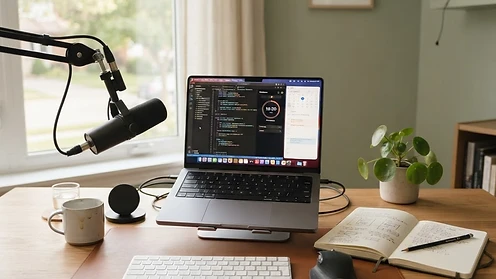
Before you accept a remote appearance, you must audit your technical environment. A judge is unlikely to trust an attorney who is struggling with audio feedback or poor lighting. Your digital office acts as your courtroom, and every pixel communicates your readiness to handle the client's case. High-quality audio is the non-negotiable standard. If a judge cannot hear you clearly, or if they are distracted by background noise, the effectiveness of your advocacy diminishes instantly. Invest in a dedicated microphone, ensure your lighting comes from in front of you, and maintain a neutral background that does not distract the court from the proceedings.
Pre-Hearing Digital Rehearsals
Just as you would walk the halls of a courthouse before a hearing, you must perform a digital walkthrough. Never assume that the court’s chosen platform—whether it be Zoom, Teams, or a specialized proprietary portal—will function seamlessly on the day of the hearing. Test your connection at the exact same hour as your scheduled appearance to account for peak bandwidth usage. Familiarize yourself with the 'raise hand' feature, breakout room functionality, and the digital exhibit upload process. Being the lawyer who knows how to navigate the platform effectively makes you a preferred choice for hiring firms who want their cases handled without technical friction.
Navigating Virtual Etiquette and Bench Presence
Remote hearings do not grant immunity from traditional courtroom decorum. You are still an officer of the court, appearing in a professional capacity. While you may be in your home office, you should dress in full professional attire. The tendency to dress down for Zoom is a trap that can lead to a perceived lack of respect for the proceedings. Your eye contact should be directed at the camera lens rather than the monitor screen, as this simulates direct eye contact with the judge. Use gestures sparingly but purposefully, and avoid multitasking while the judge or opposing counsel is speaking. Your focus should be absolute, mirroring the same level of attention you would provide if you were standing at the counsel table.
Checklist for a Flawless Virtual Appearance
To ensure you handle your coverage duties with maximum efficiency, follow this pre-hearing checklist to avoid common pitfalls:
- Confirm your platform access credentials at least 24 hours in advance.
- Check the local court rules for virtual appearance standing orders.
- Ensure your display name on the platform is your full, formal name, not a personal handle.
- Close all non-essential applications on your computer to prevent pop-up notifications from appearing during screen sharing.
- Have a secondary internet source ready, such as a mobile hotspot, in case your primary connection fails.
- Keep a hard copy of the case file and relevant pleadings on your desk for immediate reference.
Managing Client Documentation in a Cloud-First World
One of the primary benefits of appearing as coverage counsel is the ability to handle cases across jurisdictions, but this creates a challenge regarding document access. You must be able to pull up specific orders, motions, or discovery responses instantly when the judge asks a pointed question. Use a cloud-based storage system that allows for offline syncing. When preparing for a hearing, create a dedicated folder for the specific appearance containing the following:
- The master case summary provided by the hiring attorney.
- A copy of the motion or pleading currently before the court.
- The judge's current standing orders regarding remote procedure.
- A list of phone numbers for the hiring attorney's lead counsel in case an urgent consultation is needed mid-hearing.
- A digital template for your post-appearance report.
The Post-Appearance Reporting Loop
Your job as an appearance attorney does not end when the judge signs off the Zoom call. The value you provide is defined by your report back to the hiring attorney. Because they were not present, they depend entirely on your summary to advise their client on the next steps. A good report should be concise, objective, and actionable. Avoid long-form narratives in favor of bulleted updates that highlight the judge's reaction, the specific orders made, and any upcoming deadlines. If the judge expressed skepticism about a specific argument, include that nuance. By providing this level of detail, you transform a one-time appearance into a recurring business relationship. Firms remember the lawyers who make their lives easier by providing predictable, high-quality updates every single time.
Ready to cover your next appearance? See how Appear4Me works and view pricing, or create your attorney profile to start receiving coverage requests.
This article is general information for attorneys and is not legal, financial, or medical advice. Reading it does not create an attorney-client relationship.